Custom Control Example
[1]:
from IPython.display import display, HTML
display(HTML('<a target="_blank" href="https://colab.research.google.com/github/WaterFutures/EPyT-Flow/blob/main/docs/examples/control_example.ipynb"><img src="https://colab.research.google.com/assets/colab-badge.svg" alt="Open In Colab"/></a>'))

EPyT-Flow is available on PyPI and can be installed via pip install epyt-flow:
[2]:
%pip install epyt-flow --quiet
Note: you may need to restart the kernel to use updated packages.
[3]:
from epyt_flow.data.networks import load_net1
from epyt_flow.simulation import ScenarioSimulator
from epyt_flow.simulation import CustomControlModule, ScadaData
from epyt_flow.utils import to_seconds, volume_to_level
from epyt_flow.simulation.events import ActuatorConstants
A custom control module mimicing the control rules stated in Net1.inp – note that all control modules must be derived from the CustomControlModule class:
[4]:
class MyControl(CustomControlModule):
    def __init__(self, **kwds):
        # Tank and pump ID
        self.__tank_id = "2"
        self.__pump_id = "9"

        # Tank diameter could be also obtained from EPANET
        self.__tank_diameter = 50.5

        # Lower and upper threshold on tank level
        self.__lower_level_threshold = 110
        self.__upper_level_threshold = 140

        super().__init__(**kwds)

    def step(self, scada_data: ScadaData) -> None:
        # Retrieve current water level in the tank
        tank_volume = scada_data.get_data_tanks_water_volume([self.__tank_id])[0, 0]
        tank_level = volume_to_level(float(tank_volume), self.__tank_diameter)

        # Decide if pump has to be deactivated or re-activated
        if tank_level <= self.__lower_level_threshold:
            self.set_pump_status(self.__pump_id, ActuatorConstants.EN_OPEN)
        elif tank_level >= self.__upper_level_threshold:
            self.set_pump_status(self.__pump_id, ActuatorConstants.EN_CLOSED)
Create new simulation based on Net1:
[5]:
sim = ScenarioSimulator(scenario_config=load_net1(verbose=False))
Set simulation duration to two days:
[6]:
sim.set_general_parameters(simulation_duration=to_seconds(days=2))
Monitor states of tank “2” and pump “9”:
[7]:
sim.set_tank_sensors(sensor_locations=["2"])
sim.set_pump_state_sensors(sensor_locations=["9"])
Note that Net1.inp contains some simple controls. Remove all of them by calling remove_all_simple_controls():
[8]:
sim.remove_all_simple_controls()
Add our custom control module by calling add_custom_control():
[9]:
sim.add_custom_control(MyControl())
Run the simulation and show sensor readings over time:
[10]:
scada_data = sim.run_simulation()
[11]:
scada_data.plot_pumps_state()
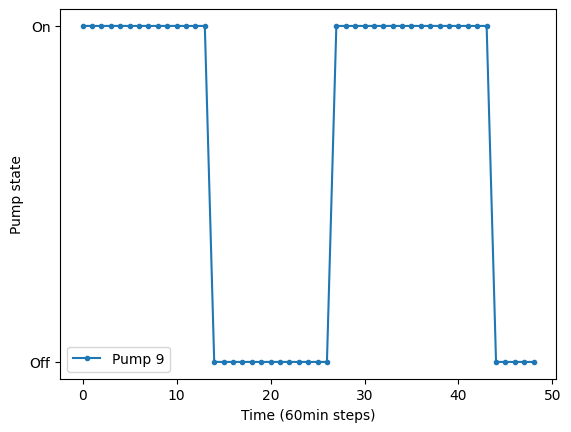
[11]:
<Axes: xlabel='Time (60min steps)', ylabel='Pump state'>
[12]:
scada_data.plot_tanks_water_volume()

[12]:
<Axes: xlabel='Time (60min steps)', ylabel='Water volume in $feet^3$'>
Do not forget to close the simulation!
[13]:
sim.close()